Sep 11, 2026
A tall backrest is one of the visual features that immediately separates a gaming chair from many conventional computer chairs. Yet a higher back does not automatically create better sitting support. The relationship between the backrest, lumbar area, seat depth, headrest, and armrests has a much greater influence on how a gamer sits during a long session.
A High Back Ergonomic Gaming Chair is therefore better understood as a coordinated seating system rather than simply a chair with extra backrest height. The design needs to support different areas of the body while still allowing natural movement.
A high backrest can provide support across the lumbar region, upper back, shoulders, and potentially the neck. However, height alone does not determine whether the chair fits the user.
Ergonomic guidance for gaming setups similarly emphasizes lumbar alignment, seat height, head position, and relaxed shoulders rather than relying on backrest height alone.
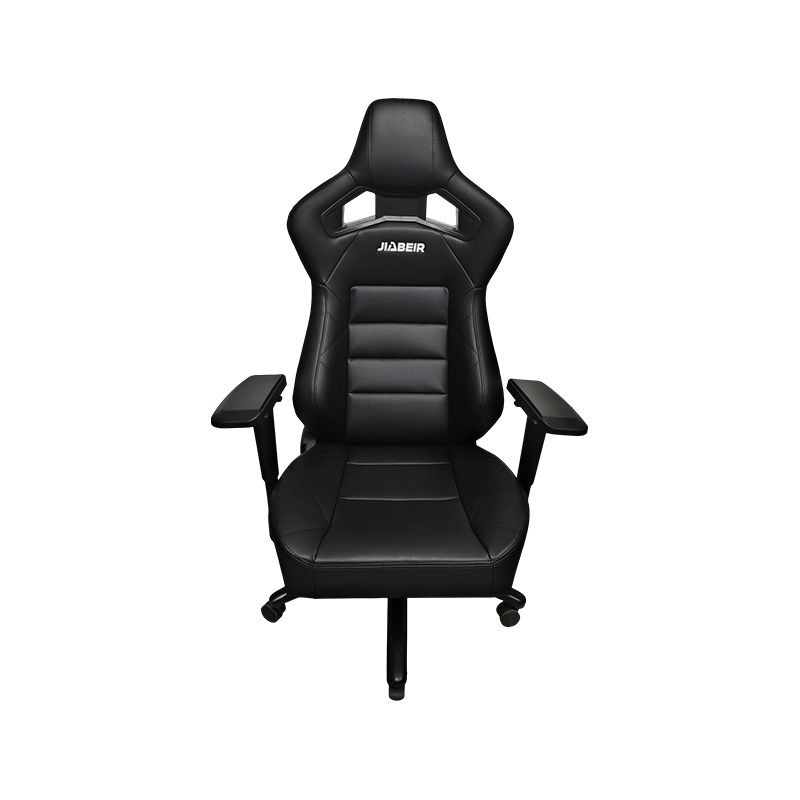
A High Back Ergonomic Gaming Chair can include several adjustment points that change the relationship between the user and the desk.
Seat height determines the position of the knees, thighs, feet, and arms relative to the desktop. Cleveland Clinic's esports guidance gives a general gaming chair seat-height range of about 16–20 inches, although the appropriate setting depends on the user and desk configuration.
The practical target is simple: feet should have stable support while the thighs remain reasonably supported by the seat cushion. A chair that sits too high can leave the feet unsupported, while excessive seat height can also change the relationship between the user's elbows and keyboard.
Backrest height receives considerable attention, but seat depth can be just as important. A deep seat can provide useful thigh support for taller users, while excessive depth may prevent a shorter user from sitting fully against the backrest.
Some current ergonomic chair designs therefore combine seat-depth adjustment with lumbar and backrest adjustment. This allows the seating surface to be positioned according to leg length rather than relying on a single fixed dimension.
The lower back has a natural inward curve. A High Back Ergonomic Gaming Chair should place its lumbar support around this area rather than simply adding thick padding across the entire back.
Adjustable lumbar mechanisms can provide greater flexibility than fixed cushions. A recent ergonomic assessment of a gaming chair, for example, evaluated lumbar adjustment, seat dimensions, backrest size, and recline as separate factors rather than treating the chair as a single component.
Too much lumbar projection can also be uncomfortable. The objective is supportive contact rather than forcing the user's lower back into an unnatural position.
Gaming does not always involve the same posture. Keyboard gaming, controller use, watching streams, and reading all create slightly different body positions.
| Chair Feature | Typical Adjustment | Practical Purpose |
| Seat height | Approx. 16–20 in. as a general gaming reference | Matches chair, desk, and leg position |
| Backrest recline | Often around 90°–135° or wider | Supports upright and relaxed positions |
| Lumbar support | Fixed or adjustable | Follows the lower-back curve |
| Headrest | Fixed or adjustable | Supports head and neck during recline |
| Armrests | 2D, 3D, or 4D designs | Positions forearms near the desk or controller |
Recline is particularly useful because users can change posture rather than remaining rigidly upright. Gaming ergonomics guidance recommends using recline as part of natural posture changes, with the head and back remaining supported.
Armrests are closely connected to shoulder and wrist position. A poorly positioned armrest can lift the shoulders or force the elbows away from the body.
These details explain why a High Back Ergonomic Gaming Chair should be evaluated as an entire ergonomic system rather than judged by its backrest appearance alone.
Body dimensions vary considerably among gamers. A chair with an 850 mm backrest and a 500 mm-wide back structure, for example, offers substantially different coverage from a compact model designed around a smaller frame. An ergonomic assessment of a gaming chair has shown how backrest height, seat width, seat depth, and seat-height range can be evaluated together to understand the intended user population.
This makes dimensional information valuable for both consumers and commercial buyers. Instead of focusing solely on exterior styling, buyers can compare:
A High Back Ergonomic Gaming Chair is not defined by height alone. Its value comes from how the backrest, lumbar support, seat dimensions, recline mechanism, headrest, and armrests work together.
For gamers spending extended periods at a computer, that distinction matters. A tall backrest may provide the foundation for full-body support, but thoughtful dimensions and meaningful adjustment determine whether that support actually matches the person sitting in the chair.
Hot Products

If you are interested in our products, please consult us!
contact us
E-mail: [email protected]
Tel: +86-577 6681 1072+86-577 6556 8920
WeChat / WhatsApp: +86-139 5884 2868
Add: Jiangnan Avenue Economic Development Zone, Nanbin Street, Ruian, zhejiang, China.
Copyright © by Ruian JIABEIR Auto Parts Co., Ltd. Rights Reserved.
Car Seats Manufacturer & Custom Modified Car Seats


 English
 русский
 Español
 Português